CONSTRUCTION NOTICE: The Howland Library is closed for expansion and renovation until Spring 2027.
NOTICE: All W-TCPL locations & services will be closed on Wed., Nov. 11 for Veterans' Day.

How to Set your PIN
STEP 1
Click on the My Account Link located on the right side of the Green Header Bar

STEP 2
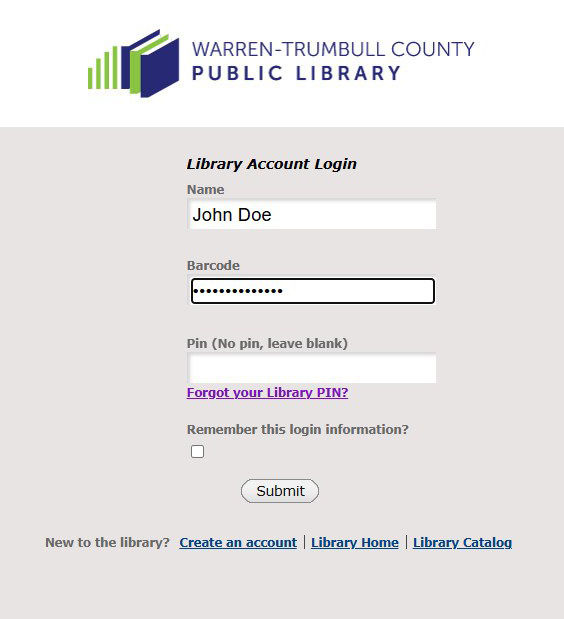
You should see a screen that looks something like the picture below. Enter your name and your library barcode. Since you don’t have a PIN yet, leave the Pin field blank. Press the submit button.
STEP 3
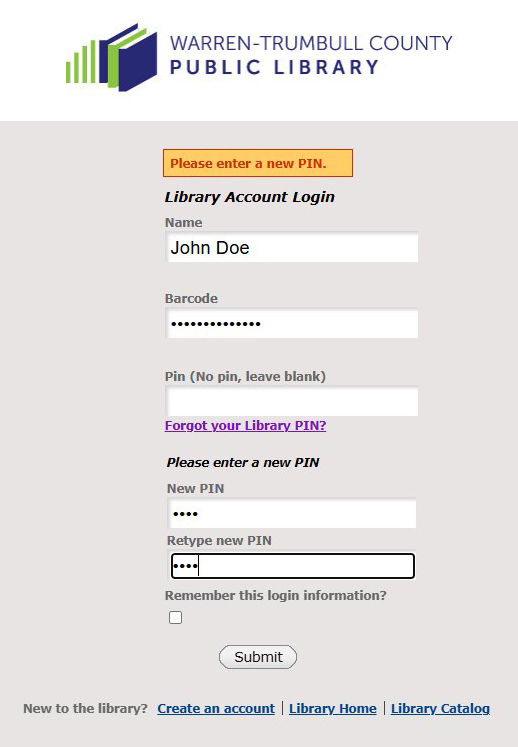
Since you don’t have a Pin, the system will ask you to setup a new PIN. It should be 4 digits (0-9). Enter it twice. Press the Submit button and you now have your Pin set up!
LOST YOUR PIN?
Follow steps 1 and 2 and click on Forgot your Library PIN link under the PIN box. You will have to have a valid email address on your account for the reset email to be sent to. If all else fails, please call the Warren Library at (330) 399-8807 or your local library location during normal business hours. and we will be happy to help get things working for you.